Activity tab
This article explains how to use the Activity tab to track and manage file-related actions in the roommaster Web app, file storage module.
What is the Activity tab
- The Activity tab provides a centralized log of all actions performed on files
- It records actions performed by all users, not just your own actions
- For each activity, you can see the user who committed the action, as well as the date and time it occurred
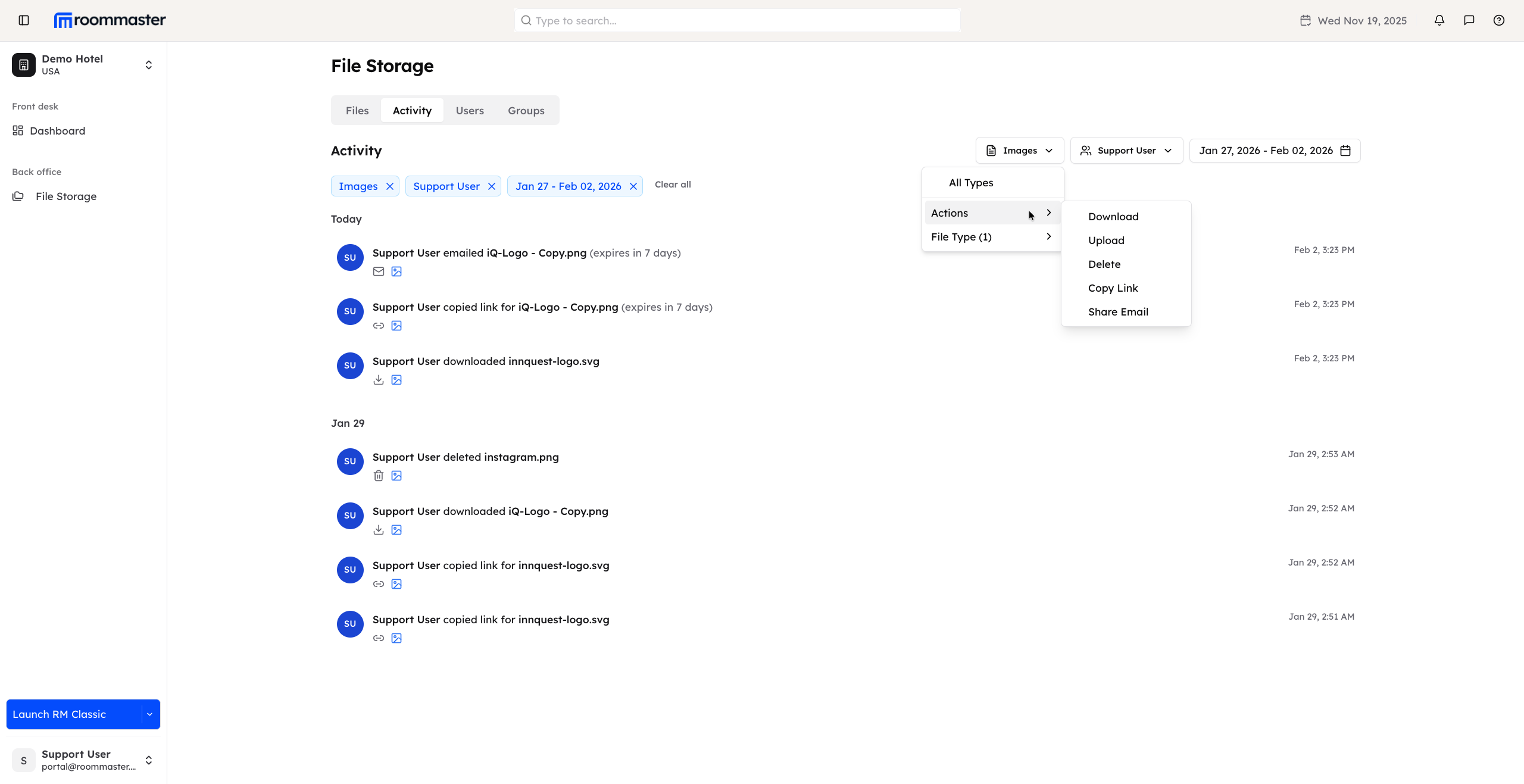
Logged activities
The Activity tab logs all file-related actions, including:
- Uploading files
- Downloading files
- Emailing files
- Copying file links
- Deleting files
This creates a complete audit trail of file usage and interactions.
Filtering activity logs
You can filter the activity list to quickly find specific actions.
Filter by action type
Filter activities by the type of action, such as:
- Downloads
- Uploads
- Deletes
- Copy link
- Email shared
Filter by file type
- Narrow down the results by selecting a specific file type
Filter by user (staff)
- Filter activities by staff member or user
- Search for a specific person to view the actions they performed
Filter by date range
- Select a date range to view actions performed during specific dates
- The date range cannot be greater than 30 days
Notes
- Filters can be combined to refine results and quickly locate relevant activity records
- The Activity tab helps with auditing, tracking user behavior, and troubleshooting file-related actions
Support
For additional support, please visit our Knowledge Base or contact our support team at support@roommaster.com.