What is TrustYou and how to activate it
What is TrustYou?
TrustYou is a platform that collects guest reviews, surveys, requests, and messages. It will help you boost your booking conversions.
How to activate it?
Please go to the menu point „Interfaces" -> „Connections" within the Hotel Manager and enable the TrustYou channel:

Retrieving an Existing TrustYou ID
To look up the TrustYou ID for a property, use the following API call and replace the property code with the one you need:
https://api.trustyou.com/hotels/mappings/seekda/AT_UAB5-05-01-04/meta_review.json?lang=de&iframe_resizer=true&key=2650316c-2188-4b3e-9aa0-658c078e0322
Where to Find the TrustYou ID
In the API response, the TrustYou ID appears under the ty_id field, for example:
"ty_id": "5d14d4c18-dfef-4676-b042-072f7f58a74b"
When a Property Has No TrustYou ID
If the property does not yet have a TrustYou ID, the API will return a null response, such as:
{"meta": {"code": 404, "error": "404 \"Unknown ID 'DEMO_MARIO'\""}, "response": null}
What to do if the ID is Missing
If no TrustYou ID exists, the property must be created by TrustYou. Please contact TrustYou:
What happens next?
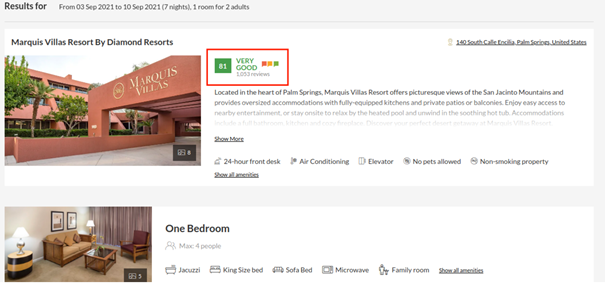
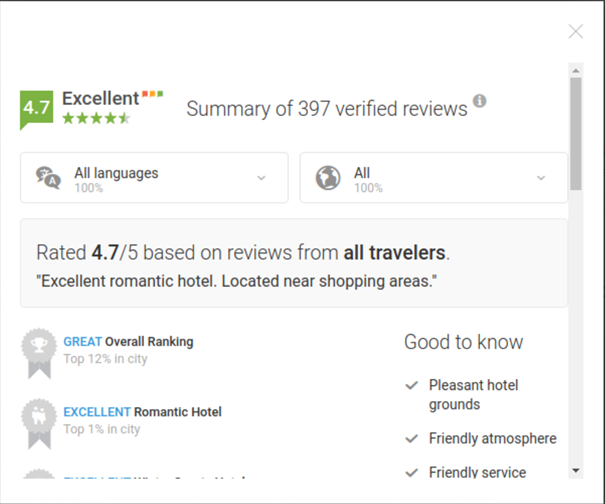
Your roommaster team gets notified and takes over from there. After the set-up has been completed via the roommaster team, the TrustYou score gets finally displayed within the Booking Engine. You will get informed as soon as this process has been completed. To get a feeling what the result looks please have a look at the example below: